You want iMessage for PC, but Apple never built a Windows app. Don’t worry. Five working iMessage on Windows options exist, and each one fits a different setup.
Apple sold about 19.9 million iPhones in the US in early 2026, roughly 60% of the market, according to Omdia. So many people work on Windows and text from an iPhone. Here is how to get iMessage on Windows without switching devices all day.
Skip any “iMessage for PC download.” Apple lists iMessage only for iPhone, iPad, Mac, Apple Watch, and Apple Vision Pro. Any site offering a Windows installer or emulator is unofficial. These can carry malware and steal your Apple Account login.
Method
Mac needed?
Group chats
Photos and videos
Full history
Difficulty
Cost
Phone Link
No
No
No
No
Easy
Free
BlueBubbles
Yes
Yes
Yes
Yes
Hard
Free
AirMessage
Yes
Yes
Yes
Yes
Medium
Free
Remote desktop
Yes
Yes
Yes
Yes
Medium
Free tiers
Cloud Mac
Rented
Yes
Yes
Yes, on that Mac
Medium
Paid
Table of Contents
Phone Link: The Easiest Way to Get iMessage on Windows 11
Phone Link is Microsoft’s free app, and it is the quickest way to use iPhone messages on PC. You need no Mac and no extra software cost.
Microsoft launched iPhone support in 2023 and rolled it out across 85 markets, first on Windows 11. Microsoft’s current requirements page now covers Windows 10 as well.
How to set it up
Open Phone Link on your PC. It comes preinstalled on Windows 11.
Install the Link to Windows app on your iPhone.
Turn on Bluetooth on both devices.
Scan the QR code, then match the pairing codes.
Allow contacts and notifications in the iPhone’s Bluetooth settings.
Phone Link works over Bluetooth, which limits it. It cannot reply to group chats, and it cannot send images, GIFs, or Memojis. It also shows only messages from the active session, so history clears when Bluetooth disconnects. Microsoft explains each limit in its messaging guide.
Quick fixes if it fails
Remove the old pairing on both devices and pair again.
Keep the iPhone close to the PC.
Turn on message previews. Microsoft’s early notes said Phone Link can’t show texts when previews are off.
Don’t expect blue or green bubbles. Phone Link doesn’t show them.
Best for
quick, one-to-one replies at your desk.
While setting up iMessage on Windows can make it easier to stay connected across devices, managing your texting costs is just as important for seamless communication. Understanding unlimited texting plans and hidden messaging fees can help you choose a cost-effective way to send messages without worrying about unexpected charges.
Blue Bubbles: A Full iMessage for PC Client (Mac Required)
BlueBubbles gives you the closest thing to a real iMessage on PC experience. The catch is that you need a Mac.
It is open-source. A server app runs on your Mac and reads your Messages. A Windows desktop client then connects to that server. You get group chats, attachments, reactions, and full history.
The Mac must stay on, signed in, and online. If it sleeps, your Windows client loses its link.
Setup takes effort. The official manual setup asks you to grant Full Disk Access and set up a way to reach the server from outside your home. Some extras, called Private API features, need you to turn off macOS System Integrity Protection. BlueBubbles warns that this is at your own risk. Skip those extras if you want a safer setup.
Best for: anyone who owns a spare Mac and wants a full inbox on Windows.
Air Message: Use iMessage on PC from a Web Browser
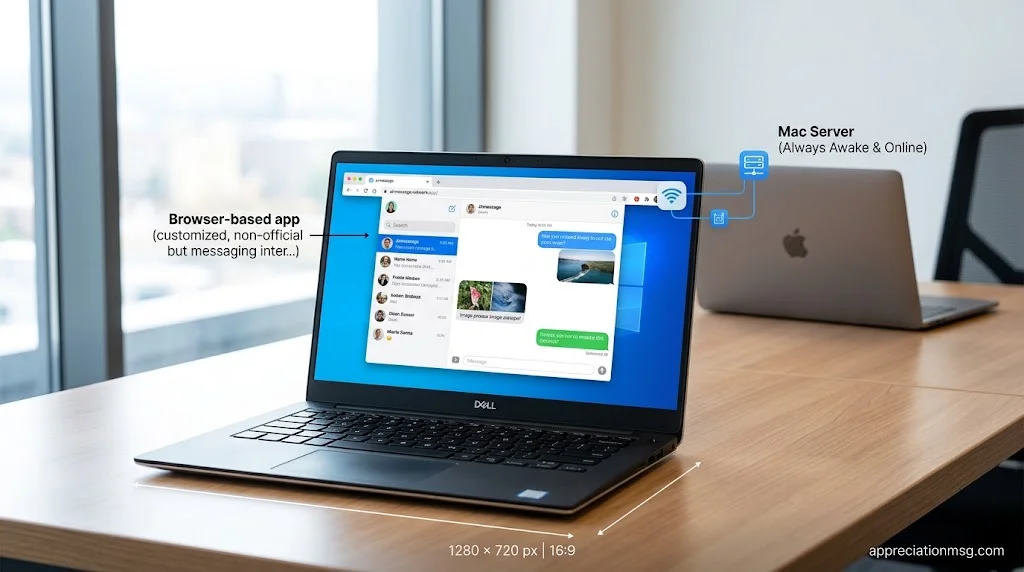
AirMessage lets you use iMessage from a web browser. It also needs a Mac.
It works much like BlueBubbles. A server app on the Mac connects to Messages, and you reach it through the AirMessage web client from any Windows browser. You install nothing on the PC.
Can I use iMessage from my web browser?
Not with anything official. Apple has no Messages page on iCloud.com. AirMessage is a third-party bridge, so the Mac must stay awake and online.
Choose AirMessage over BlueBubbles if
You prefer a browser to a desktop app.
You want less setup on the Windows side.
Choose BlueBubbles if you want a native Windows app and more features.
Remote Desktop: Run Mac Messages on Your Windows PC
Remote desktop skips the middleman. You open your Mac’s screen on your PC and use the real Messages app.
Tools like Chrome Remote Desktop, AnyDesk, and TeamViewer all work. You install a host app on the Mac, then connect from Windows. macOS will ask you to allow Accessibility and Screen Recording. Some tools also ask for Full Disk Access.
Why people like it
You see your full history, group chats, photos, and videos.
You need no relay server.
You can use the Mac for other tasks too.
What to watch
The Mac must be on, awake, and online.
Speed depends on your internet connection.
It is remote control, not a native Windows app.
Use a strong password and remove any device you don’t recognize from the tool’s access list.
Cloud Mac: iMessage on Windows Without Owning a Mac
No Mac at all? You can rent one over the internet and log in from Windows. This is the only option here for people with no Apple computer.
Providers like MacinCloud rent remote Macs. Third-party reviews put pay-as-you-go access at about $1 per hour and shared monthly plans near $25 to $29, as of mid-2026. Check current prices before you buy.
Cost check
at $25 to $29 a month, a year runs $300 to $350. For daily use, a used Mac mini may cost less over time.
Risks to know
Signing in puts your Apple Account on hardware you don’t own.
Apple may send two-factor codes to your trusted devices, so keep your iPhone nearby.
Shared machines can slow down when other users are busy.
Use a dedicated machine if privacy matters.
Best for
short-term use, or testing before you buy a Mac.
FAQs
Can I install iMessage on my PC?
No. Apple offers no native Windows app. You can use Phone Link, or connect to a Mac with a bridge or remote desktop.
Can I download Apple iMessage for my PC?
No. No official download exists. Fake installers are common, so avoid them and stick to the methods above.
Is there an iMessage on a laptop?
Yes, on a MacBook, where Messages is built in. On a Windows laptop, use Phone Link or one of the Mac-based options.
How to use iPhone messages on PC?
Pair your iPhone with Phone Link over Bluetooth. You can then read and reply to one-to-one texts. For group chats and photos, connect to a Mac instead.
Can I use iMessage on Windows in 2026?
Yes, with limits. Phone Link works without a Mac but handles only basic texts. A Mac unlocks the full experience.
Conclusion
If you only need quick replies, start with Phone Link. If you want groups, photos, and full history, use a Mac with BlueBubbles, AirMessage, or remote desktop. And if you have no Mac, a cloud Mac gets you there. Pick the iMessage for PC method that matches your needs and budget.
A R Gujjar is a passionate writer sharing appreciation, heartfelt, funny, and thank-you messages to help readers express their feelings with meaningful words.

















1 thought on “iMessage for PC: 5 Easy Ways to Get iMessage on Windows”